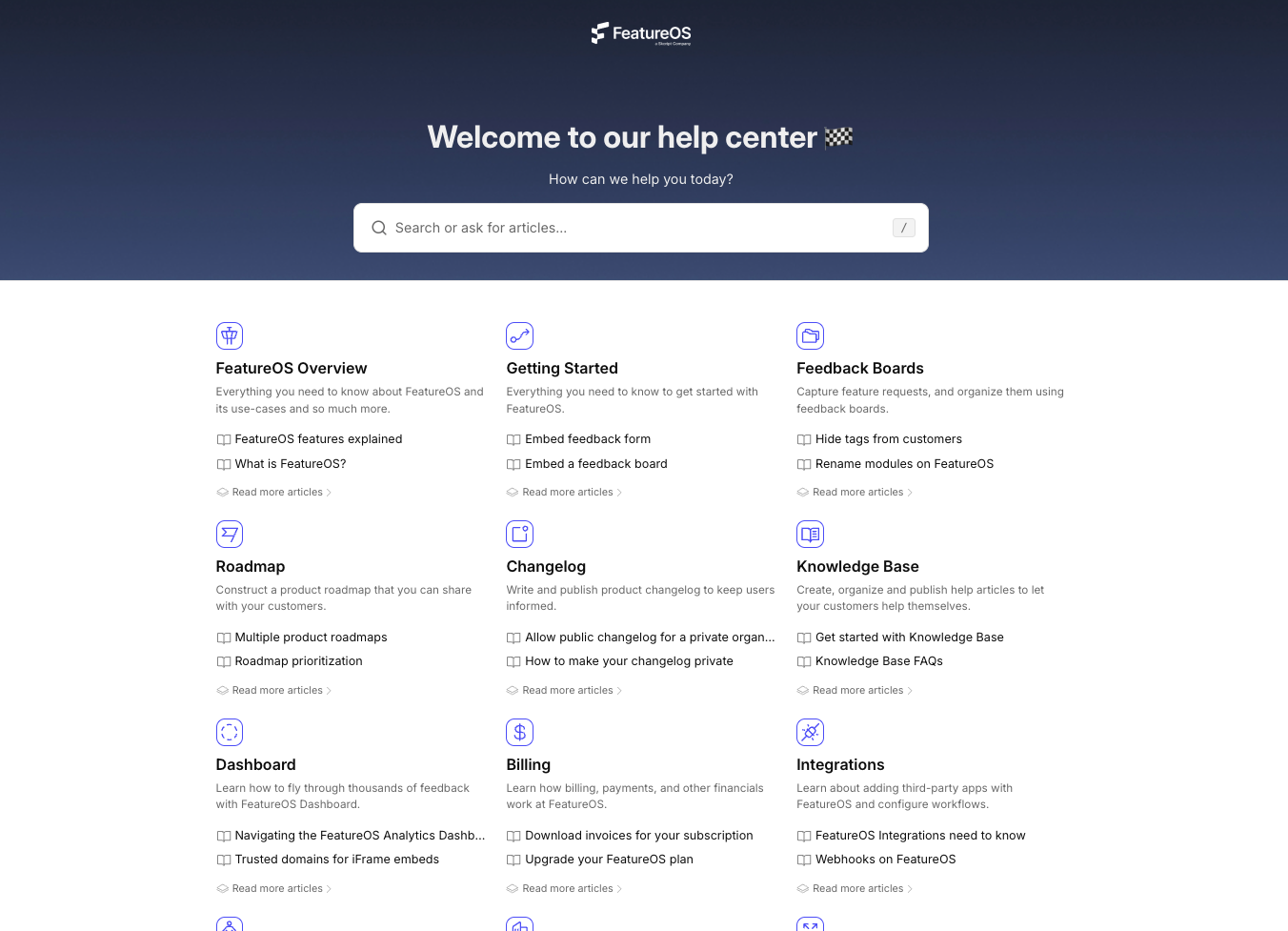
Knowledge Base
Knowledge Base That
Answers Like Google
Deliver self-service support with intelligent vector search that feels as natural as Googling a question.

Seamless Zendesk Integration
Seamlessly connect FeatureOS with Zendesk by linking articles, sync updates, and bring your knowledge base closer to your support workflows.
Support Global Customers with 21 Languages
Deliver localized help content across 21 supported languages to ensure every customer gets clear, accessible guidance. Expand your support reach and create a truly global knowledge experience with ease.
Choose Between Public, Private, or Internal Knowledge Bases
FeatureOS lets you manage knowledge access your way to make your help articles public and searchable for all users, keep it private for selected customers, or restrict it internally for your team with link-only access.
Choose Visibility
A public knowledge base helps customers find answers quickly, reduces support tickets, and boosts transparency by keeping all resources open and searchable online.
Powerful Knowledge Base Editor
Create, edit, and organize articles effortlessly with the FeatureOS Knowledge Base Editor.
White-Labeled Knowledge Base
Brand your Knowledge Base with your own logo, domain, and colours for a seamless.
SEO Titles and Descriptions
Improve discoverability, by helping users find your articles easily on Google.
Customers who trust FeatureOS
Customer Requests closes the gap between our product and go-to-market teams. Our Sales and Success orgs now track feature requests at a customer level, and feedback flows directly into our development workflow.
Convert Changelog to a Knowledge Base Article
The Help Center That Helps Everyone
Reduce repetitive tickets by giving your users the power to solve their own problems. FeatureOS makes creating help docs, guides, and FAQs intuitive and fast.

KAL Intelligent Search Empower your users with a search experience that feels just like Google. With KAL’s intelligent search, users can type questions, phrases, or even incomplete queries, helping users discover answers faster, reduce support dependency, and improve overall self-service satisfaction.
Instantly Create Help Articles from Changelog Convert your published changelogs into detailed help articles instantly. Streamline documentation, save time, and keep your support resources perfectly aligned with every new release.

AI-Powered Summaries for Effortless Reading Help users grasp key points faster with AI-generated summaries of lengthy documentation. FeatureOS automatically condenses long articles into short, clear overviews in one click, so readers can quickly understand what’s inside before diving into details, improving engagement and accessibility.

Notify Subscribers of Knowledge Base Updates Keep your users informed automatically whenever new articles are published or existing ones are updated. Subscribers receive instant notifications, ensuring they always have access to the latest product information, guides, and documentation without missing any critical updates.

Make Knowledge Base Articles Interactive Transform your Knowledge Base into a dynamic, engaging space with interactive features like comments, reactions, FAQs, and subscriptions. These engagement features help you keep content relevant, understand what’s working, and give users more ways to engage beyond just reading an article.

Share Your Knowledge Base Using Link, Embed, or In-App Widget With FeatureOS, you can share articles via direct links, embed them seamlessly into your website or app, or offer in-product help through the support widget. Combine all three methods to deliver a smooth, always-available support experience that keeps users informed and reduces ticket volume.
Compare Boards Pricing
See exactly what's included in each plan and choose the right one for your needs.
| Features | Starter | GrowthPopular | Business |
|---|---|---|---|
| Knowledge Base | |||
Articles | 120 articles | 250 articles | Limitless |
Collections | Limitless | Limitless | Limitless |
Google-like Search Experience | |||
Custom Domain | |||
Embeddable Knowledge Base Widgets | |||
Automatic AI Summaries | |||
Private Knowledge Base | |||
Knowledge Base Analytics | |||
Unlisted Articles | |||
Private Knowledge Base | |||
Multi-language Support | |||
Article Subscriptions | |||
Import from Zendesk | |||
Private Article Collections | |||
Customizable SEO Metadata | |||
Custom Head Scripts | |||
Article Reactions & Comments | |||
Assign to Team Members | |||
API Access | |||
10,000 requests. One roadmap.
You're ready to ship. We're ready to help. Stop managing the noise and start building your future.