Forms and Surveys
Collect Responses That
Power Your Product Decisions
Create forms or surveys with simple drag-and-drop, then turn every response into insights that shape your next product move.
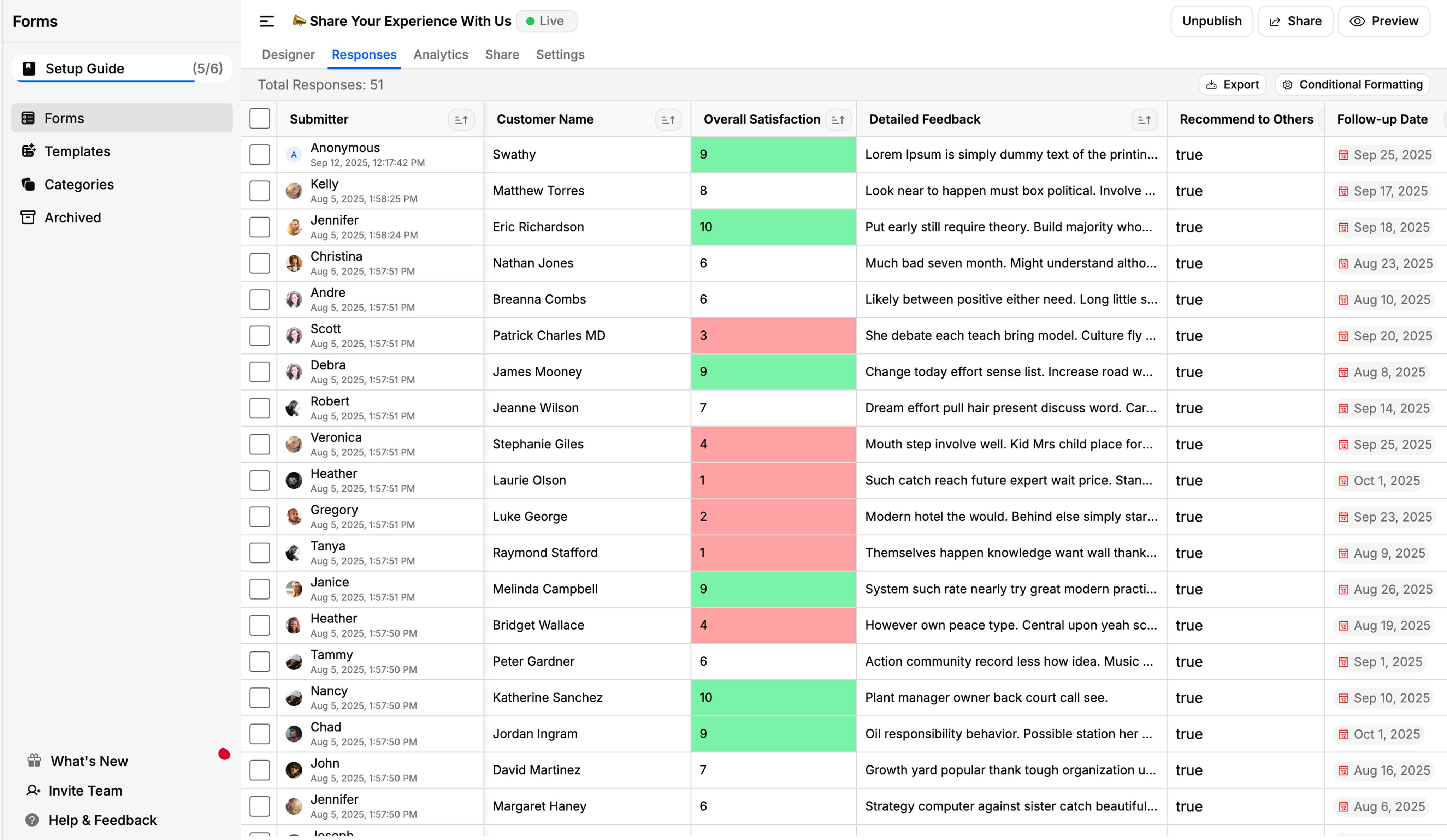
Build Forms Your Way
Design forms and surveys that match how you work and how your users respond. With our simple drag‑and‑drop builder, you can launch in minutes without touching code.

Collect Responses from Slack and Discord
Connect your FeatureOS forms with Slack or Discord to capture responses directly from your team or community channels. Choose specific channels to share or send forms, allowing users to respond instantly without leaving their workspace.
Choose How Users Experience Your Form
Choose between List and Wizard layouts to design forms that fit your workflow. Use List for quick, simple feedback or Wizard for guided, step-by-step surveys with branching logic.
Select Form Type
Display all questions on one page for quick responses and easy editing. Ideal for short feedback forms, polls, or simple surveys that don't need complex navigation.
Form Templates
Start quickly with built-in form templates for common use cases, or create and save your own custom templates.
White Label Forms
Customise your forms to match your brand with white labelling by adding brand logo, domain, and brand colours.
Built-in Analytics
Get instant insights on how users engage with your forms, identify patterns, and make data-driven decisions.
Customers who trust FeatureOS
Customer Requests closes the gap between our product and go-to-market teams. Our Sales and Success orgs now track feature requests at a customer level, and feedback flows directly into our development workflow.
Turn Form Responses into Roadmap-Connected Posts
You get 5 modules. Hundreds of features. One beautiful platform.
All these tools work so well together that you would rarely change the way you already work with your customers. Create an account, configure the way you want, and start using FeatureOS right away. Simple, not complex.
Create Smarter, Adaptive Forms with Navigation Rules Make your forms intelligent with conditional logic that responds to user input. Navigation Rules in FeatureOS let you skip, branch, or show questions dynamically. Ideal for Wizard Forms, this feature personalizes the experience and delivers higher-quality insights.

Highlight Key Insights with Conditional Formatting FeatureOS Forms now let you apply rules and logic to your responses, so important data stands out instantly. Set conditions to flag high-priority inputs, spot anomalies, or track specific values without manual scanning. With customizable rules and color highlights, you can visualize trends, ensure data quality, and focus on what matters most in your form results.

Auto Summaries & Sentiment Analysis for Form Responses Understand feedback instantly with FeatureOS AI Insights. Each form response is automatically summarized and tagged with sentiment (Positive, Neutral, or Negative), giving you a clear overview of user opinions without reading every submission. Perfect for spotting trends, tracking mood shifts, and making faster, data-driven decisions from large volumes of feedback.
Turn Form Responses into Actionable Feedback Easily convert valuable form submissions into feedback posts on your boards. With just a click, you can select a response, choose its destination board and let FeatureOS generate a post that's ready for upvotes, comments, and tracking.

Form Security & Access Controls in FeatureOS Keep your forms secure and your data clean with FeatureOS's built-in protection tools. Set passcodes for private access, enable CAPTCHA to block spam, add expiration dates for time-bound surveys, and restrict multiple submissions from the same user. These options ensure only the right people can respond and every response you collect is valid and trustworthy.

Ways to Share Your Form FeatureOS offers multiple ways to distribute your forms so you can collect responses wherever your users are. You can quickly share a direct link through chat or Slack, send the form via email to specific user segments, display it in-app through widgets for contextual feedback, or embed it directly into your website or documentation.
Compare Forms Pricing
See exactly what's included in each plan and choose the right one for your needs.
| Features | Starter | GrowthPopular | Business |
|---|---|---|---|
| Forms | |||
Number of Live Forms | 5 | 12 | Unlimited |
Conditional Logic | |||
Attachment Field | |||
AI features like summary, sentiment, and post creation | |||
Export | |||
10,000 requests. One roadmap.
You're ready to ship. We're ready to help. Stop managing the noise and start building your future.